Friday, 1 March 2019
Monday, 21 January 2019
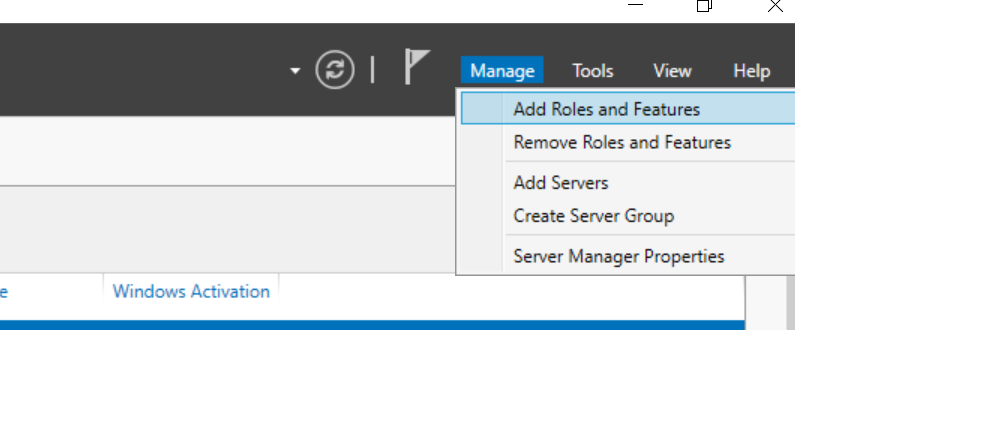
The Tool was unable to install Web Server(IIS) Role
SharePoint 2019 unable to install Web Server Role
The issue was due to .Net 3.5 framework was not installed, hence Follow the below steps
The sources file is on your Windows Server 2016 installation media, and you need to specify it and have it mounted
on your computer (or copied somewhere) for the prerequisite install to work properly
Make sure to replace the F:\sources\sxs to the actual path of your sources file.
Everything should work properly afterwards to run the prerequisite installer
Monday, 14 May 2018
Export User Subscribed Alerts to CSV PowerShell
cls
asnp "*sh*"
$web=Get-SPWeb http://msdev02dp:3636/
$alertCollection = @()
foreach($alert in $web.Alerts)
{
$ExportItem = New-Object PSObject
$ExportItem | Add-Member -MemberType NoteProperty
-name "UserName"
-value $alert.User.DisplayName
$ExportItem | Add-Member -MemberType NoteProperty
-Name "Email"
-value $alert.User.Email
$ExportItem | Add-Member -MemberType NoteProperty
-name "Title"
-value $alert.Title
$ExportItem | Add-Member -MemberType NoteProperty
-name "EventType"
-value $alert.EventType
$ExportItem | Add-Member -MemberType NoteProperty
-name "Frequency"
-value $alert.AlertFrequency
$alertCollection += $ExportItem
}
$alertCollection
| Export-CSV
"D:\Useralerts.csv" -NoTypeInformation
$web.Dispose()
Saturday, 28 October 2017
Restore Deleted SiteCollection PowerShell
PowerShell Script to Restore Deleted SiteCollection from a Webapplication
Get the Specific Webapplication ID and use GetDeltedSites() method to to find out ID your deleted sitecollection and use Restore-SPDeletedSite command let to restore the sitecollection
Add-PSSnapin "Microsoft.SharePoint.PowerShell"
$WebApplication = Get-SPWebApplication
-Identity http://spdev2016:2626/
$restore = $WebApplication.GetDeletedSites()
Restore-SPDeletedSite -Identity 1b0af67e-2f0d-413c-b8b7-9dec119dbc8c -WebApplication 7f1ac80d-d8fb-4a0a-9715-3865a4d139c5
-Confirm:$false
Thursday, 5 October 2017
Remove Mantainance Mode of SharePoint Site
PowerShell Script to remove Maintenance of a site
cls
asnp "*sh*"
$Admin = new-object Microsoft.SharePoint.Administration.SPSiteAdministration('http://siteurl/’)
$Admin.ClearMaintenanceMode()
Wednesday, 30 August 2017
SharePoint FrameWork Development EnvironmentSetup Set by Step
Follow the below steps to your SharePoint Framework Dev setup
1. Install Node.js first (node.js)
https://nodejs.org/en/
Open Powershell command window check for installation and its version status of Node.js
npm -v
2. Install visual studio code
https://code.visualstudio.com/download
3. Open Powershell command window and then install yeoman and gulp with below command
npm install -g yo gulp
4. npm install @microsoft/generator-sharepoint -g
yoman is going to install all project scafoldings(creating project structure solution will be generated
gulp trust-dev-cert to install
gulp serve
1. Install Node.js first (node.js)
https://nodejs.org/en/
Open Powershell command window check for installation and its version status of Node.js
npm -v
2. Install visual studio code
https://code.visualstudio.com/download
3. Open Powershell command window and then install yeoman and gulp with below command
npm install -g yo gulp
4. npm install @microsoft/generator-sharepoint -g
yoman is going to install all project scafoldings(creating project structure solution will be generated
gulp trust-dev-cert to install
gulp serve
Monday, 13 March 2017
CSOM TermStore GetTerms
CSOM Get Groups in TermStore/CSOM Get Termsets in TermStore/ CSOM Get Terms in TermSets
OutPut :
using System;
using
System.Collections.Generic;
using
System.Linq;
using
System.Text;
using
System.Threading.Tasks;
using
Microsoft.SharePoint.Client;
using
Microsoft.SharePoint.Client.Taxonomy;
namespace
TermstoreCSOM
{
class Program
{
static void Main(string[] args)
{
ClientContext ctx = new ClientContext("http://SPDev2013:3636/");
ctx.Credentials = new System.Net.NetworkCredential("username", "pwd","domain");
//Get the Taxanomy Session
TaxonomySession tx = TaxonomySession.GetTaxonomySession(ctx);
ctx.Load(tx, t => t.TermStores);
ctx.ExecuteQuery();
//Get the defualt TermStore from
Taxonamy Session
var ts = tx.TermStores[0];
ctx.Load(ts);
ctx.ExecuteQuery();
Console.ForegroundColor
= ConsoleColor.White;
//Print the TermStore Name
Console.WriteLine(ts.Name);
//Get the Groups inside the
Termstore
TermGroupCollection groups =
ts.Groups;
ctx.Load(groups);
ctx.ExecuteQuery();
foreach( TermGroup group in groups)
{
Console.ForegroundColor
= ConsoleColor.Yellow;
//Print Each Group inside the
TermStore
Console.WriteLine("TermGroup
is :" +group.Name);
//Ge the Termsets inside the
Each Group
TermSetCollection
termsetcollections = group.TermSets;
ctx.Load(termsetcollections);
ctx.ExecuteQuery();
foreach (TermSet t in
termsetcollections)
{
Console.ForegroundColor
= ConsoleColor.Green;
//Print Each
Termset
Console.WriteLine("TermsetName
is :" + t.Name);
ctx.Load(t);
ctx.Load(t.GetAllTerms());
ctx.ExecuteQuery();
//Get All
the Terms inside the TermSet
TermCollection terms =
t.GetAllTerms();
ctx.Load(terms);
ctx.ExecuteQuery();
foreach (Term term in terms)
{
Console.ForegroundColor
= ConsoleColor.DarkCyan;
//Print Each
Term inside TermSet
Console.WriteLine("Terms
is :" + term.Name);
}
}
}
Console.ReadKey();
}
}
}
Subscribe to:
Posts (Atom)